


Most plugin advice online is opinion‑dressed‑as‑fact: a list of “top 10 must‑have WooCommerce plugins,” usually written by someone selling one of them.
We looked at hundreds of WooCommerce merchants who started a store in the past 12 months, and found a clear four‑phase pattern. At the same four points in their growth, stores reach for predictable plugin categories.
If you’re building a store, this is a rough roadmap of what to prioritize next. If you’re building plugins, this is a hint about when merchants are open to hearing from you.
The four phases of a WooCommerce store
Our data reveals a logical, four‑phase journey. Each phase is defined by a combination of store age and order count, and each phase has a dominant problem the merchant is trying to solve.
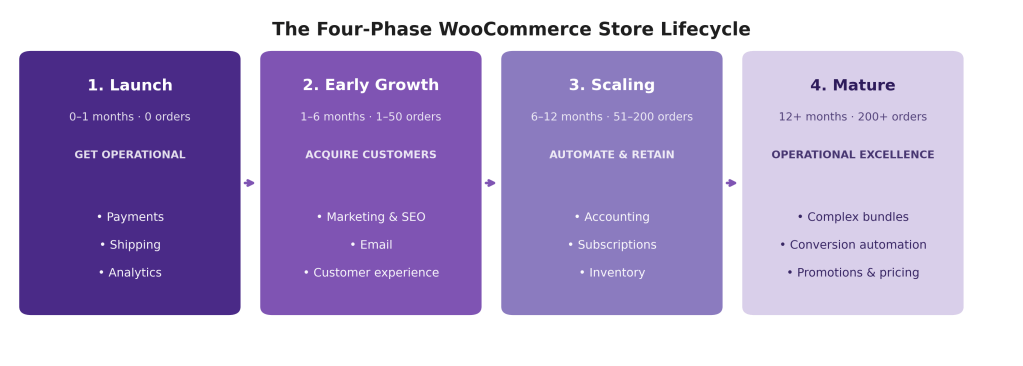
Merchants don’t install “everything they’ll ever need” on day one. They install what unblocks the next constraint. Get a payment processor working. Then a shipping label printer. Then something to drive traffic. Then something to retain the customers that the traffic produced. The plugin stack grows in lockstep with the problems the store is solving.
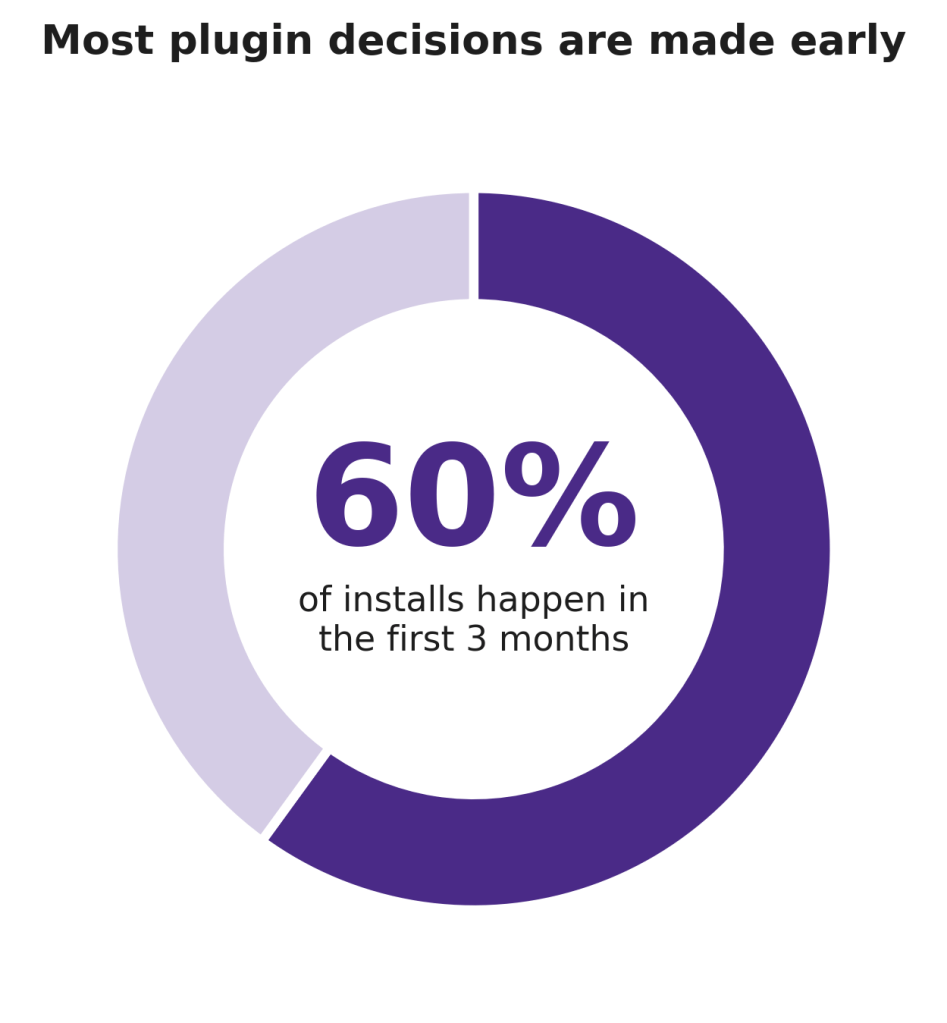
60% of all extension installs happen within the first 3 months of a store’s life. The early decisions made by people who often have zero orders set the store’s trajectory for years.
Phase 1 — Launch
(0–1 month, 0 orders)
THE GOAL: Get operational and make the first sale.
New merchants pick plugins that work out of the box. Reliability and zero setup beat features.
In the launch phase, merchants are racing to get their store live. The plugins they install reflect that urgency: payments, shipping, and basic analytics. Free and bundled extensions dominate. Anything that introduces friction or cost is deferred.
What gets installed
- Payments: WooPayments, PayPal Payments, Stripe.
- Shipping and Logistics: WooCommerce Shipping, ShipStation, Shipment Tracking, SendCloud.
- Analytics and Tracking: WooCommerce Analytics, Google Analytics for WooCommerce.
Across the Woo Extension Marketplace, around 61% of all payment plugin installs and more than half of all shipping plugin installs happen in this very first month. These percentages are much higher than other extension categories.
Phase 2 — Early Growth
(1–6 months, 1–50 orders)
THE GOAL: Acquire customers and convert traffic.
With operations stable, merchants spend their next plugin slot on growing the top of the marketing funnel.
Once the first orders trickle in, attention shifts towards customer acquisition and conversion. Marketing, email, and customer experience plugins surge. The median marketing extension is installed at around the 21st order, right when merchants have validated demand and are ready to invest in scaling.
What gets installed
- Marketing and SEO: Yoast SEO Premium, Kliken Ads + Meta Pixels, TikTok, Facebook.
- Email and Communication: MailPoet, Mailchimp.
- Customer Experience: LiveChat for WooCommerce, WhatsApp Order and Live Chat.
This is the phase where promotional tools start to outperform basic operational ones. Conversion‑related extensions, like reviews, coupons, and abandoned‑cart recovery, begin appearing in the same window.
Phase 3 — Scaling
(6–12 months, 51–200 orders)
THE GOAL: Automate operations and retain customers.
More orders mean more time‑consuming work. Merchants start optimizing for repeat revenue.
By this stage, the store is no longer experimental. It’s a real business with real operational scaling issues. Plugin installs shift towards accounting integrations, subscriptions, and inventory tools. Loyalty programs and memberships are starting to show up as merchants try to boost repeat‑order rates rather than just chase new traffic.
What gets installed
- Accounting and Reporting: QuickBooks Sync, WooCommerce Xero.
- Loyalty and Subscriptions: WooCommerce Points and Rewards, WooCommerce Subscriptions, WooCommerce Memberships.
- Inventory and Products: Back In Stock Notifications, Bulk Stock Management.
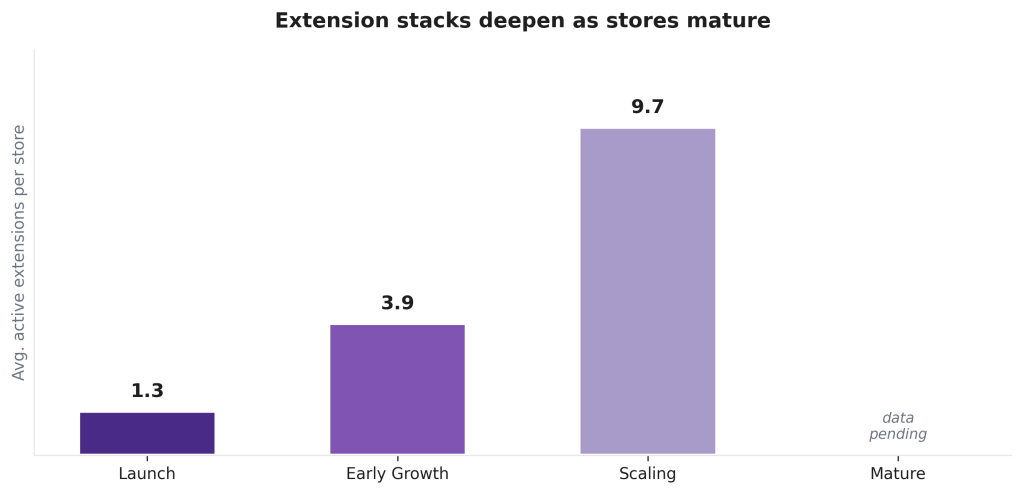
On average, scaling‑stage stores have around nine to ten active extensions. This is about seven times the count of a launch‑stage store. The extension stack isn’t just bigger, it’s also more specialized, with plugins picked to reduce specific operational problems rather than for general utility.
Phase 4 — Mature
(12+ months, 200+ orders)
THE GOAL: Operational excellence and channel expansion.
Price sensitivity drops. Mature merchants pay for depth, automation, and reliability, not novelty.
Experienced merchants need sophisticated management, scaling, and omnichannel solutions. The selection criteria have inverted. Where a launch‑phase merchant picks the cheapest plugin that works, a mature merchant picks the most capable one that fits their workflow. Feature depth and integration quality dominate.
What gets installed
- Complex product bundles: Product Bundles, Composite Products for WooCommerce.
- Conversion enhancement and automation: AutomateWoo, Klaviyo.
- Complex promotions and pricing: Dynamic Pricing, Name Your Price.
Note: this analysis covers stores observed over a 12‑month window, so the mature‑phase signal is directional rather than fully measured. The plugins above reflect what’s commonly seen in stores that have already passed 200+ orders within that window.
Three patterns we’ve seen
1. Plugin decisions are made earlier than you think
If you’re a plugin creator, the moment that matters is launch. Roughly six in ten extension installs happen in the first three months of a store’s life. This is long before most merchants have a clear picture of their needs. Convenience, default recommendations, and host bundles disproportionately shape which plugins ever get a fair shot.
2. Categories peak at predictable points
Different plugin categories don’t spread their installs evenly across the lifecycle: each one has a clear center of gravity. Payments and shipping spike at launch. Marketing and conversion tools cluster around the early‑growth window. Customer‑service tooling lags slightly behind, picking up once a store has enough orders to need real support workflows.
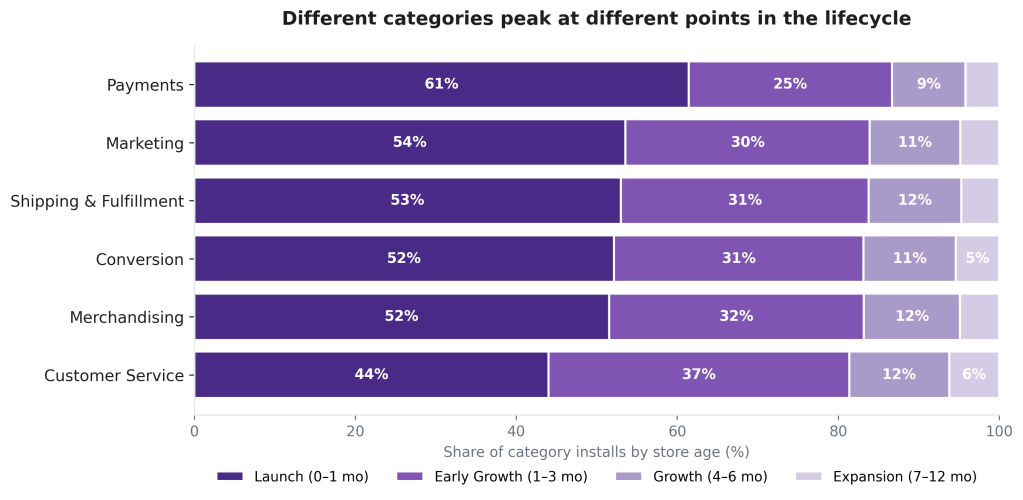
For merchants, this is permission to relax. If you’re six months in and you haven’t touched a customer‑service plugin yet, you’re not behind , you’re on schedule.
3. One plugin wins each category, almost everywhere
Across nearly every plugin category we looked at, a single extension captures the majority of installs while everyone else fights over the scraps.
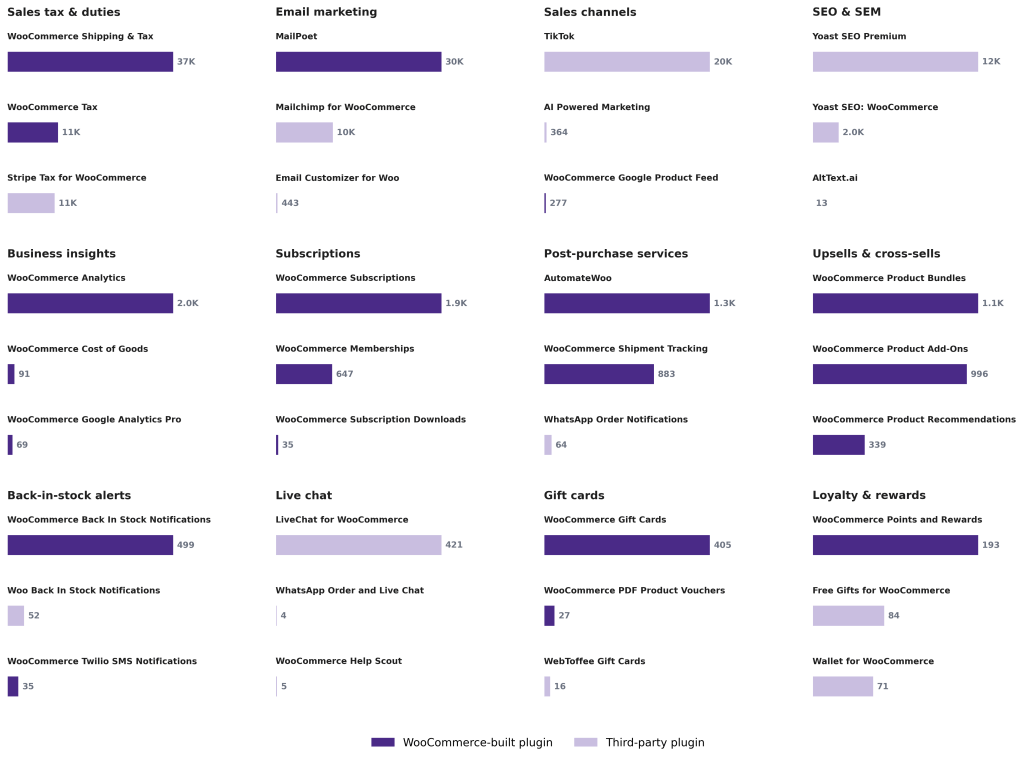
Where Woo ships its own extension, that extension is almost always #1, and often #2 and #3 as well. In sales tax and duties, WooCommerce Shipping & Tax is at around 37K stores, more than three times its nearest competitors, WooCommerce Tax (~11K) and Stripe Tax (~11K). MailPoet leads email marketing with about 30K stores, almost 3× Mailchimp for WooCommerce (~10K). WooCommerce Subscriptions sits on around 1.9K stores, nearly 3× the number of WooCommerce Memberships (~650). WooCommerce Analytics leads in business insights, with ~2K stores, compared to under 100 for the next‑ranked option. In subscriptions, business insights, upsells and cross‑sells, the entire top three is Woo‑built.
Where Woo doesn’t ship its own extension, a third‑party plugin takes the top spot, and the gap is just as steep. TikTok leads the sales channels category with about 20K stores, more than 50× the runner‑up. Yoast SEO Premium leads in SEO with around 12K stores against ~2K for the second‑ranked Yoast plugin (and basically nothing below that). LiveChat for WooCommerce holds 421 stores in the live chat category, small in absolute terms, but more than 80× the next‑ranked option.
Why does this pattern repeat regardless of who builds the leader? Two things are true at once. The leading plugin in each category usually is, on the merits, a perfectly good option, well‑known, well‑maintained, and broadly recommended. But that recommendation also feeds back: once a plugin is the obvious default in marketplace search results, host bundles, or the WooCommerce admin, every new store that picks it reinforces its lead, and it becomes the more obvious recommendation for the next merchant. Discovery surfaces and merchant preference are doing roughly equal work.
For merchants, the practical takeaway is simple. In categories where Woo ships its own extension, the official option is rarely a wrong call: it’s the safe, well‑supported choice, and it’s what the bulk of comparable stores have already picked. In categories Woo doesn’t cover, e.g. SEO, live chat, external sales channels, and advanced ad management, the leader is third‑party, and the right answer depends more on the specific merchant’s workflow. It’s worth doing a real comparison rather than defaulting to the most‑installed option.
A merchant playbook
If you’re running a WooCommerce store and wondering what to install next, the data suggests a specific sequence:
- Month 0–1 (Launch). Pick a payment processor, a shipping integration, and a basic analytics plugin. Resist the urge to install anything else.
- Month 1–6 (Early Growth). Once orders are flowing, add one SEO/marketing tool, one email tool, and one customer‑experience tool. Three new plugins, not thirteen.
- Month 6–12 (Scaling). Add an accounting integration, then a loyalty or subscriptions tool if your business model supports recurring revenue.
- Year 1+ (Mature). Replace anything you’ve outgrown. By this point, depth and reliability matter more than the install button.
The stores that grow well aren’t the ones with the longest plugin list. They’re the ones whose plugin stack matches their stage of growth.
A note on methodology
This analysis is based on aggregated WooCommerce extension activity across new stores registered (created) in a recent 12‑month window. We grouped stores by age and order count to define the four lifecycle phases, then looked at when extensions in each category were installed.
A few caveats: “Store lifecycle” doesn’t have a single industry definition. The four‑phase framing here is one reasonable story, not the only one. Some plugins arrive pre‑bundled with hosting packages, which can inflate launch‑phase install numbers in certain categories. And because the observation window is just 12 months, the mature‑phase numbers should be treated as indicative, not conclusive. To understand what happens after year one, we’ll need a longer observation window.
We’d love feedback. If the four‑phase framing rings true for your store, or if your experience contradicts it, tell us. The next iteration of this work will be better for it.







 Data for Breakfast
Leave a comment