

This post is the first in a series about what we learned from developing search products for WordPress.com. In this post, I’ll give you a brief tour of some learnings from deploying search in the WordPress.com Reader. Improving this search tool to help our users find engaging articles they really like is an effort, and an ongoing learning experience.
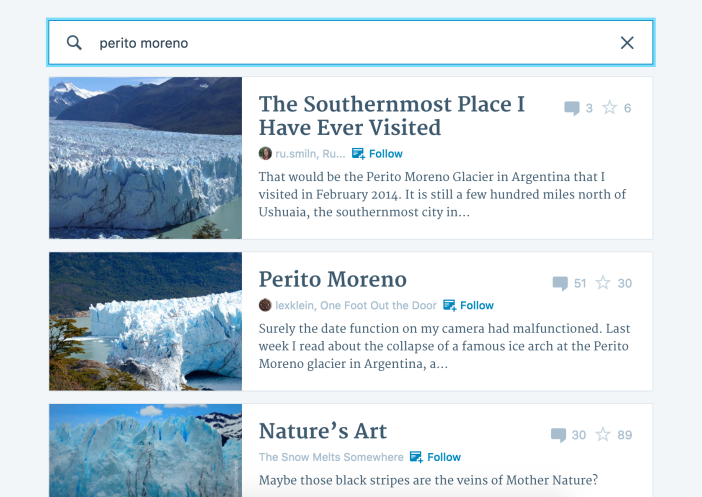
The WordPress.com Reader is the place where our users can keep up with sites they like, whether they’re personal blogs, high profile sites on WordPress.com, or sites that connect to WordPress.com with Jetpack. In fact, users can add any RSS feed they like. The list of sites I follow includes Office Today, TED Ideas and 500px ISO as well as several data science blogs.

The Reader is also a great tool for discovering new content, and this is where the search functionality contributes a lot. When we analyzed where our users found new sites to follow, we saw that a quarter of all new site follows originate with the search tool.
Challenges
At WordPress.com, we have a very large body of documents. There are literally billions of posts on our platform, and it is rapidly growing every day. We find that Elasticsearch is a great tool to handle all these documents and to make them searchable.
The documents we deal with are also very heterogenous: they cover all kinds of topics. Some are very long, like the ones you’ll find highlighted on Longreads, and some are photo posts. Some are written by professionals, some by novice writers who are just starting to find their voice. Our authors live in all parts of the world, and they write in many different languages.
As on any publishing platform, it is only natural that authors try to get as much attention for their sites as possible. At WordPress.com, we offer many tools to promote posts. But when an author crosses the line from self-promotion to spam, we have to protect readers’ interests. We constantly work to balance authors’ interests in promotion with readers’ interest in easily finding the highest quality content.
In addition to mastering these challenges, we have to match our users’ intents and expectations.
Users’ expectations
Users approach search with different intents [1]. Some are looking for information (informational searches). Some want to navigate to a specific site (navigational searches), and some wish to perform a transaction, like booking a flight or changing a setting (transactional searches). Users expect a search engine to cater to every type of search. In the WordPress.com Reader, we see all three of these search types. However, most searches don’t fit neatly into any category, and are best described as “looking for inspiration” or “keeping up with a topic.”
Even though we might each approach a search box with different goals, there are general trends in what most of us hope to find in search results. Broadly summarizing the research of Barry & Schamber [2] and Crystal & Greenberg [3], all of the following are important:
Relevance: Most importantly, the results should be relevant to the keywords we entered, especially the first couple of results — scrolling is tiring, and we form opinions about the quality of the search algorithm itself by skimming through the initial results.
Trust: No one likes being taken to a sketchy site or spammy article.
Originality: We prefer original content on trustworthy sites, ideally written or endorsed by experts in the subject matter. More detailed information is usually preferred over shallow content.
Clarity: At the same time, documents should be written with great clarity and should match our level of understanding; a tourist searching for the term Panther might not need the same type of information as a biologist searching for Panthera onca.
Novelty: New content is better than old, outdated documents.
Diversity: A list of search results is most compelling when it includes all possible meanings of the search terms, and contains different views and approaches to the subject. A classic example is the word “jaguar;” if no additional information is given, the search results should contain articles about both the animal and the car.
Top searches
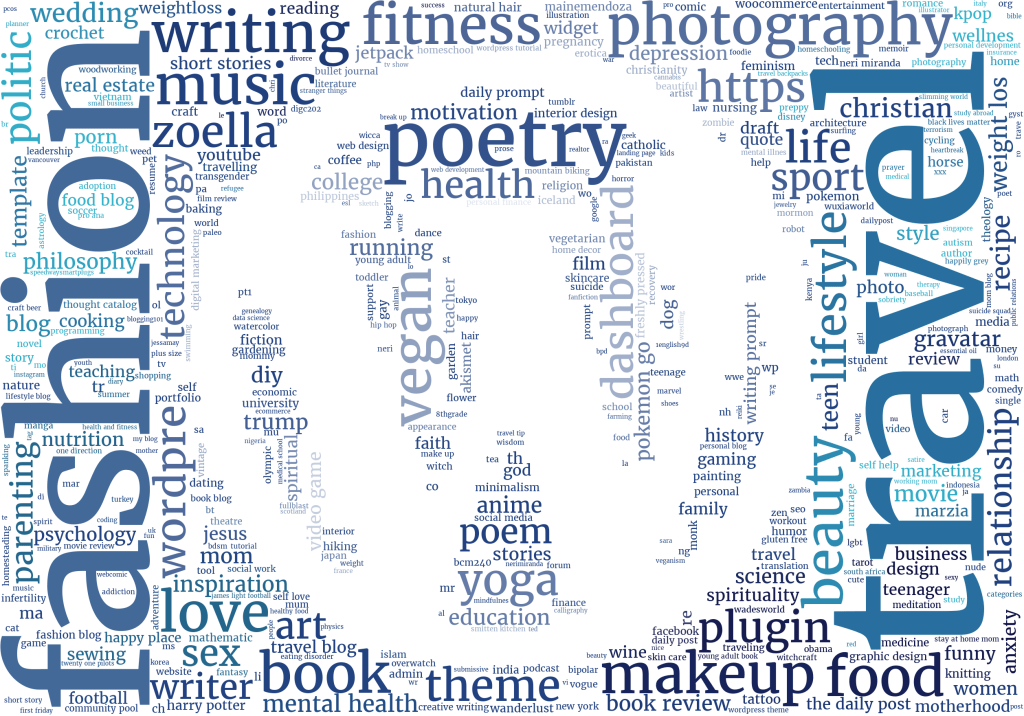
To understand our own users’ needs better, we took a look at the top searches after the initial launch of the search box using a python wordcloud package to visualize the 500 most frequent search terms. The bigger the font size, the more users have entered the term.
(Note: Our search is search‑as‑you‑type: When a user pauses while typing their search request, we return results that match the partial search string. If the user sees what they were looking for in these results, we record only a partial search string.)

The top searches contain many broad topics like fashion, travel, photography, and poetry. In addition, there are searches related to the website customization and management and blogs on our platform (like theme and widget). These make up roughly 2% of the total volume of searches in the WordPress.com Reader. Finally, we also see that users search for the work of our editorial team (like the daily post).
These observations highlight that it is important that we continue developing our search engine with our users’ interest in mind. In the next posts in our series Intro to Search, we’ll outline the anatomy of search engines in general and ours in particular, and discuss how to measure performance from click data.
Recommended reading and sources:
[1] Broder, A taxonomy of web search, AMC SIGIR Forum, Volume 36 Issue 2, Fall 2002, Pages 3 – 10, article
[2] Barry & Schamber, Users’ Criteria for Relevance Evaluation: a Cross-Situational Comparison, Information Processing & Management Vol. 34, No. 2/3, pp. 219-236, 1998, article
[3] Crystal & Greenberg, Relevance criteria identified by health information users during Web searches, TOC, Volume 57, Issue 10, August 2006, article
[4] Manning et al, An Introduction to Information Retrieval, Cambridge UP, 2009, pdf
[5] Liu, Learning to Rank for Information Retrieval, Springer, 2011




 Data for Breakfast
Leave a reply to 3danim8 (aka Ken Black) Cancel reply